
Advertisement
Guide on how to upload YouTube Videos from iPad, iPod, iPod Touch and other iOS devices.
One thing that we do from time to tome is uploading videos. Irrespective of the kind of device we have, we love to upload the videos we have taken, either on YouTube, or on any of the social networking sites that we have our accounts in. that is the way the young generation loves to keep themselves and the other people related to them updated. But the latest iDevices unfortunately don’t allow these functions to take place from their respective devices. 
The official app for YouTube is there for these devices and it does not allow the user to upload any kind of video from the account. Whether it is an iPad or an iPod, one simply is helpless. Though Google has taken an initiative and has brought in the latest app called YouTube Capture, which would allow one to upload videos, was initially for iPod and iPhone and has recently been upgraded for the iPad and iPad mini too. This makes things a lot more convenient and easier for the iDevice user. It gives him or her no reason for complaining. This app has made things away more convenient for a lot of people as videos now can be uploaded with ease on the required website.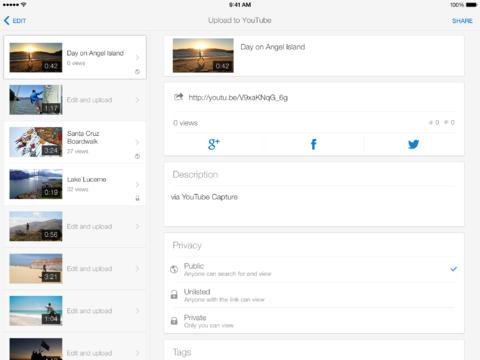
When one has this app, he or she can use it to film videos and films, and can instantly be made available on YouTube, and can be ready for it too. What comes along with the video is proper auto stabilization, proper color and back ground music, auto color correction and at the same time it can be made available on goggle +, facebook, twitter, and YouTube of course is there. And the best part is all this can be done at the same time. You need to sign in with your Google account, keep camera which has good quality, select the resolution, and the customized music is in built, and this also allows different privacy levels.
Advertisement
Features
- Videos can be uploaded on all sites simultaneously
- Color corrections, music selection, stabilization and trimming all can be done
- Very fast and easy recording
Compatibility: Apple iPhone, Apple iPad, Apple iPad Mini, Apple iPod, Apple iPod Touch
Advertisement