광고
Block/unlock/delete/hide contacts in WhatsApp. Check this out for Android, 아이폰 OS, BlackBerry, Windows Phone phones & tablets.
WhatsApp is an ultimate messaging apps available for all the popular mobile platforms. We have gone through many of WhatsApp guides and tutorial, some of them are: Hide last seen time, Backup WhatsApp, Restore Chat History and others can be found at WhatsApp tag on our site.

If you of your friends are disturbing you on WhatsApp then there is option to block particular WhatsApp contact. This guide is especially suitable for girls annoyed of unknown person and other people with whom they wants to stay away.
Before blocking someone on WhatsApp, one should know what the blocking feature actually does. So here are the details:-
- The messages sent by blocked contacts will never be shown or delivered to you.
- Your “Last Seen At…” and “Online” information will not be seen by the blocked contact(s).
- Changes to profile picture will not be seen by the blocked contact(s).
- You will not be able to send messages to the blocked contact(s).
A common query is if the blocked contact will be able to tell if they have indeed been blocked by you. There are certain things that the blocking feature in WhatsApp does not do. Here are the two major ones:-
- Your status message will be visible to blocked contact(s).
- Blocked contact(s) will be still visible in your contacts list and you will be still visible in their contacts list.
Block Contacts on WhatsApp
Blocking is a feature that is widely used when an individual(s) are consistently bothering someone, in case there is a contact that you don’t want to be associated with ever then deleting the contact is the best option.
With that said here is how to block contacts in various phone platforms:-
Block WhatsApp Contacts on Android
- Open WhatsApp, and then go to Chat Screen.

- Tap 메뉴 > 설정 > Contacts > Blocked Contacts.
- If you haven’t blocked any contacts previously then there won’t be any contacts listed. The contacts you do block will be added to this list.
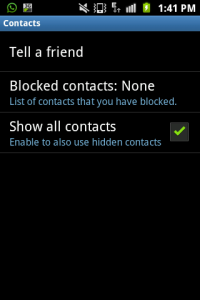
- Select Add Block Contacts on top right icon.
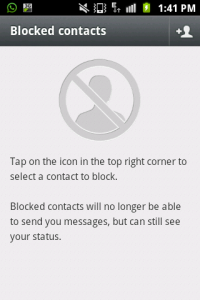
- Select the contact you want to block.
Block WhatsApp Contacts on iPhone
- In iPhone there is a block option available firsthand when a message arrives from a contact that is not in the address book. In this case you can tap block, which is on top left and immediately block the contact.
- If you want to block contacts that are already in the address book then follow the below steps.
- Open WhatsApp.
- Go to 설정>Chat Settings>Blocked
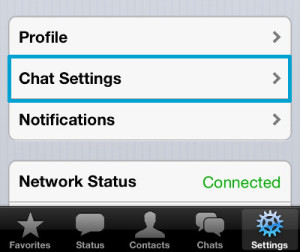
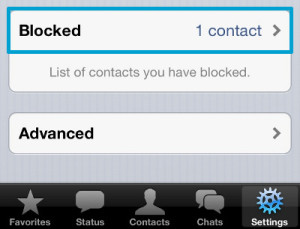
- Tap the + icon on the top right.
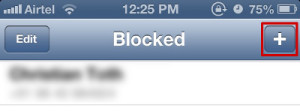
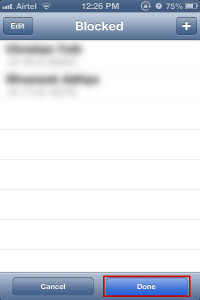
- Select the contacts you want to block and then select Done.
Blocking WhatsApp Contacts on Blackberry
You can block any WhatsApp contacts on BlackBerry phones, follow the guide mentioned below -
- Open WhatsApp.
- Select 설정 on top right (the gear icon).
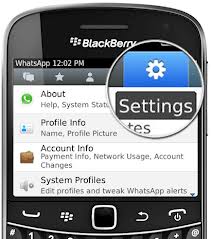
- Select Blocked Contacts and add the contacts you want to block.
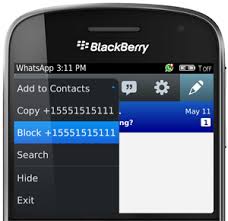
- Unknown contacts can also be easily blocked, by going to the message of the unknown number, tapping the blackberry button and selecting Block.
Blocking on Windows Phone
The same thing happens when you are on Windows Phone as well, follow the guide -
- In case of unknown number, open the Message.
- Tap the three dots (…) on the bottom right corner.
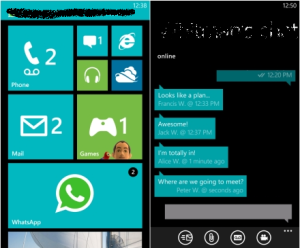
- Select Block.
- For known contacts follow the below steps.
- Open WhatsApp.
- Select the three dots (…) on the bottom right corner.
- Go to 설정 > Blocked Contacts.
- Tap the + icon and select the contacts you want to block.
Unblock WhatsApp Contacts
After blocking certain contacts, you may want to unblock them in the future. Here are the steps how to unblock contacts on WhatsApp in various phone platforms:-
Android
- Open WhatsApp.
- Tap 메뉴 > 설정 > Contacts > Blocked Contacts
- Here the contacts that have been previously blocked will be listed.
- Long-press the contact you want to unblock.
- Select Unblock
Unblock on iPhone
- Open WhatsApp.
- Go to 설정>Chat Settings>Blocked
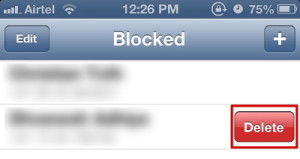
- Tap Edit, then Tap the minus sign that is visible in front of the contacts that are blocked.
- Tap Delete and then Tap Done.
Unblock on Blackberry
- Open WhatsApp
- Select Settings on the top right corner (the gear icon).
- Select Blocked Contacts.
- Select the contacts you want to unblock.
- Press the blackberry icon button on the phone.
- Choose Unblock.
Unblock on Windows Phone
- Open WhatsApp
- Select the three dots (…) on the bottom right corner.
- Select 설정>Blocked Contacts.
- Long-press the contact you want to unblock.
- Select Delete.
If you have any trouble or question do let us know via comments. We will provide our best help to resolve the issue. You can also read our list of 10 best WhatsApp alternatives.
광고
Hello I’d like to know if I block a contact then delete them, do they stay blocked? Please.
No, you can block them later on or block them whenever you want.
Hello, I need to block and delete a contact. But in order for me to delete I have to unblock. This defeats the purpose because the contact is then able to whatsapp me again, albeit no name but I can see their ph.#
Hello, So I blocked a contact for a while and then tried unblocked them; but after I did I couldn’t send or receive messages from them. I can’t even see their status updates, profile picture or anything. That person tried messaging me too but it never went through though I have unblocked them. I also tried uninstalling/re installing the whatsapp app. multiple times, same result. Can anyone tell me how i fix this please? I have an Android ( Samsung Galaxy S4).
Sorry to hear that Arnaud, but WhatsApp blocking and unblocking works good indeed. I never had any problem with that. But to help you please email complete details about it on [email protected] and also try get in touch with WhatsApp support via Twitter or Facebook.
How long after unblocked will the time show uo
Hello karshim, whatsapp is a great app indeed. just want to ask i lost my phone and so as my conversation in it. can i get back my whatsapp conversation in my new phone.
How can i know how long ive been blocked
Sorry! That can’t be known until the next person is your friend.
If i block a contact, then can i hide on my phone that this contact is blocked?
I mean, can i do something on my phone so it does not show that there are any blocked contacts? I have an iphone
No! That is not possible. The Blocked Contacts appears differentiate from the normal contacts but they do appear on your Whatsapp contact list.
How do I unblock a contact from my what’s up but I delete them also from the blocking list on my what’s up? & now I can’t unblock them because I Deleted them from the blocking list also.
Yo need to add them again as friend.