Near Field Communication is the latest technology adopted for easy touch and share features. Using the NFC you can transfer content like photos, songs, videos and files via wireless method. For data exchange using NFC you should bring the device to close proximity and then you can directly tap to share the content. Unlike Bluetooth which require pairing and sending to devices in the close proximity range, this doesn’t require such steps to be followed. It’s pretty easy provided that your phone has the NFC chipset. NFC has occupied its space in commerce providing ecommerce payments, mobile payments, multi player mobile games, identity and access tokens as that we see in MWC and CES off recently.
NFC is build on the RFID communication method and it provides two way communication between the devices rather than one way application which was prevalent until now. This is why we see NFC readers and tags (NFC Tags as used in the Sony powered Android Phones) also able to read the NFC chips. NFC doesn’t come pre-installed on all the devices. However since 2012 we see many more devices coming out with this feature pre-installed. For comprehensive devices list visit NFC Enabled Phone. Moreover its reported that 20 % of the smartphones will be with NFC feature by 2014.
Toggle NFC ON/OFF
To make use of the NFC feature you should enable it first, here is the instructions on how you can turn NFC OFF and ON on your Android smartphone –
- From your device, drag down the notification bar and then tap on Settings. In many smartphones with Android mobile OS, Settings are available by going through Menu > Settings.
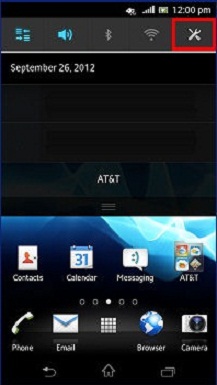
- In Settings, tap on the “Wireless & Network” icon. Sometime in many smartphones it’s found under “More”.
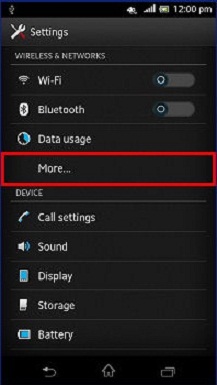
- If your devices comes with NFC chipset pre-installed, then in the Wireless & networks, you will see NFC.
- Tap NFC to toggle it ON and OFF.
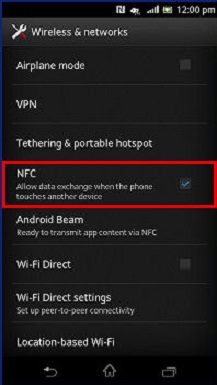
- When the NFC is ON you will see a box appearing with a blue check. Moreover NFC logo (NFC certified logo) will be displayed in the notification bar.
- You can now return back to Home screen easily.
- To disable the same you should follow the same instructions and tap on the NFC icon. When NFC is turned OFF there will not be anything like blue check and no more you will find the NFC icon in the notification bar.
Also Read - Best Smartphone with Amazing Battery Life
Do let us know via comments if you have any issues with NFC on your phone.